What is a Bill of Materials (BOM)? A Complete Guide for Manufacturers
A Bill of Materials (BOM) lists all components needed to manufacture a product. Learn about BOM types, key components, calculations, and why it's essential for manufacturing success.

What is a Bill of Materials?
Let me explain this in the simplest way possible.
Imagine you want to make a sandwich. You’d need bread, butter, cheese, lettuce, and tomatoes. If you wrote down all these items with exact quantities - like “2 slices of bread” and “3 slices of cheese” - that list would be your sandwich’s Bill of Materials.
A Bill of Materials (BOM) works exactly the same way for manufacturing. It’s a complete list of everything you need to make a product - every material, every part, every small component - along with quantities, costs, and where to get them.
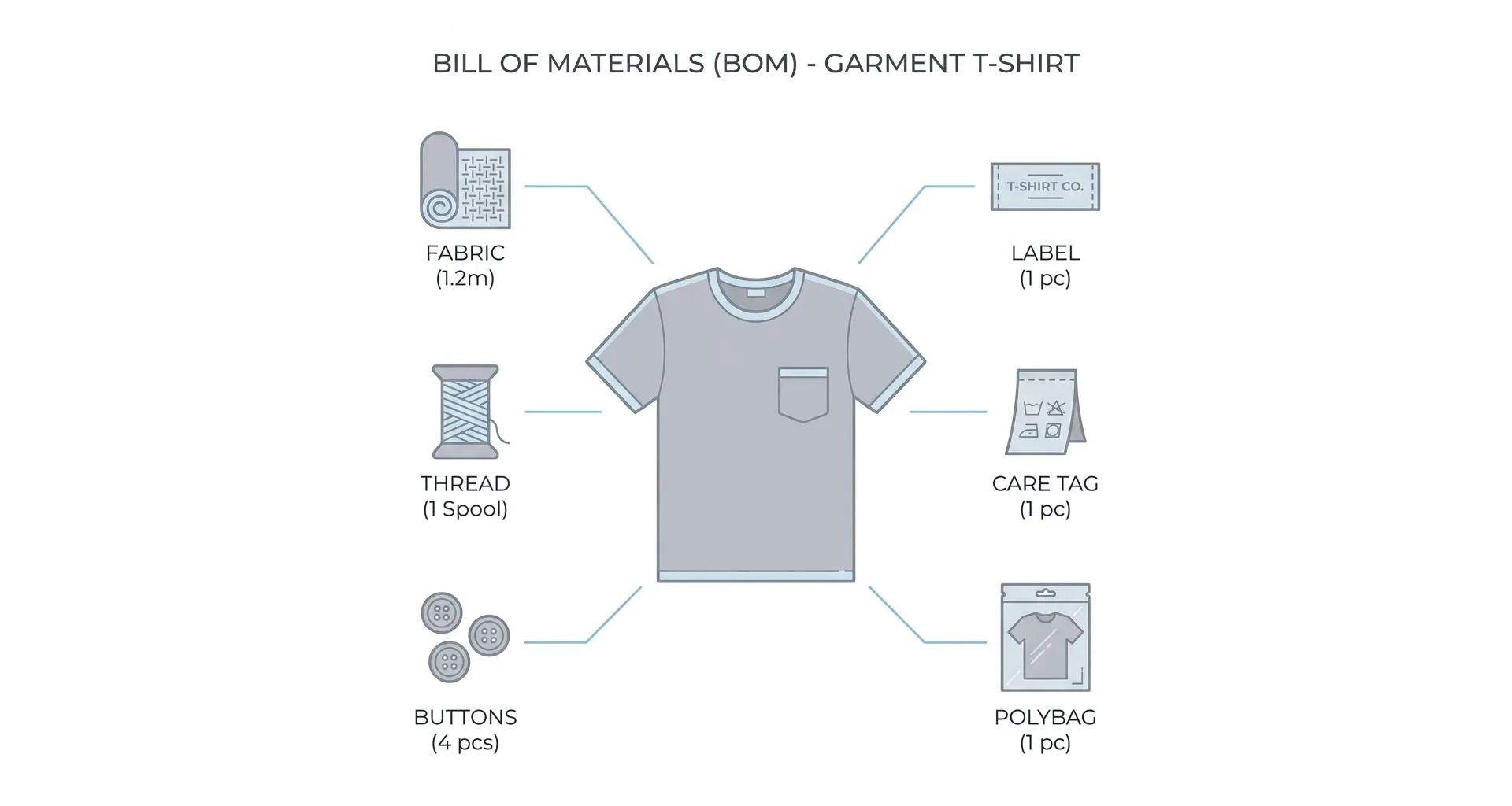
For a shirt manufacturer, the BOM includes fabric, buttons, thread, labels, care tags, polybags - literally everything that goes into making and packing that shirt.
That’s really all it is. A recipe for manufacturing.
Free Tool: Need to create a Bill of Materials quickly? Try our Free Online BOM Generator to create, calculate costs, and download professional BOMs instantly.
In this guide, I’ll break down the key components of a BOM, explore different types, show you how calculations work, and explain why getting this right matters so much for your business.
Why Every Manufacturer Needs a Proper BOM
I’ve seen this happen many times. A manufacturer accepts a new order, production starts, and halfway through they realize they’re short on buttons. Or zippers. Or that specific thread the buyer requested.
The order gets delayed. The buyer is frustrated. And someone starts pointing fingers.
This chaos almost always traces back to one problem - no proper Bill of Materials.
Without a BOM, you’re basically asking your team to cook a complex dish without a recipe. Maybe they’ll get it right. Maybe they won’t. And you definitely can’t replicate it consistently.
The BOM becomes the single source of truth that connects everyone - your design team, procurement, production floor, and accounts department. Everyone works from the same information. No more confusion about what goes into the product.
Key Components of a Bill of Materials
A well-structured BOM contains specific information for each item. Here’s what you need to include:
Part Number and Name
Every component needs a unique identifier. This part number or SKU allows you to reference items quickly without confusion. Along with the number, include a clear, commonly understood part name that everyone on your team can recognize.
For example, “BTN-BLK-12L” might be your code for a black 12-ligne button, while the name reads “Black 4-Hole Plastic Button.”
Part Description
The description provides detailed information that helps identify and differentiate similar parts. This becomes crucial when you have multiple variants of the same item.
A button description might include: “4-hole plastic button, matte finish, 12L size, suitable for shirting, nickel-free.”
Quantity Required
This specifies exactly how many units of each component are needed to produce one finished product. Precision matters here - if your shirt needs 8 buttons, the BOM should say 8, not “some buttons.”
Many manufacturers also add a wastage percentage to account for defects or production losses. A 5% wastage allowance on fabric means you order slightly more than the calculated requirement.
Unit of Measurement
Each item should specify how it’s measured. Fabric might be in meters or yards. Buttons in pieces. Thread in cones. Elastic in rolls.
Mixing up units causes procurement disasters. If your BOM says “2 fabric” without specifying meters, someone might order 2 yards, 2 rolls, or 2 bales.
BOM Level
This indicates where an item sits in the product hierarchy. Level 0 is typically the finished product. Level 1 contains the major assemblies or components. Level 2 breaks those down further.
For a jacket, Level 1 might include “Shell Assembly” and “Lining Assembly.” Level 2 under Shell Assembly would list the outer fabric, interlining, and other shell components.
Procurement Type
Specify whether each component is purchased off-the-shelf or manufactured in-house. This affects lead times, costing, and planning.
If you make your own buttons, that’s different from buying them from a supplier. The BOM should reflect this.
Cost Information
Include the unit cost for each component. This enables accurate product costing and helps identify areas where you might reduce expenses.
When fabric costs ₹250 per meter and you need 1.5 meters per piece, the BOM should reflect both figures.
Supplier Details
Note which suppliers provide each component. This becomes invaluable when reordering or when you need to switch sources quickly.
Notes and Special Instructions
Any manufacturing-specific instructions belong here. Assembly sequence, quality specifications, testing requirements, or handling precautions.
Types of Bill of Materials Explained
BOMs come in different formats depending on their purpose and complexity. Understanding these types helps you use the right approach for your situation.
Single-Level BOM
A single-level BOM is a straightforward, flat list of all components needed to produce a product. It doesn’t show any hierarchical relationships or sub-assemblies - just a simple list.
Example: For a basic t-shirt, a single-level BOM might list:
- Cotton fabric: 0.8 meters
- Sewing thread: 0.01 cones
- Neck rib: 0.15 meters
- Main label: 1 piece
- Care label: 1 piece
- Size label: 1 piece
- Polybag: 1 piece
Single-level BOMs work well for simple products without complex assemblies. They’re easy to create and understand. However, for complicated products, they become unwieldy and don’t show how components relate to each other.
Multi-Level BOM
A multi-level BOM, also called an indented BOM, shows the hierarchical relationship between components and sub-assemblies. It breaks down the product into various levels, with the finished product at the top and individual parts at lower levels.
Example: For a formal jacket, a multi-level BOM might look like:
Level 0: Finished Jacket
- Level 1: Shell Assembly
- Level 2: Outer fabric
- Level 2: Fusible interlining
- Level 2: Shoulder pads
- Level 2: Sleeve lining
- Level 1: Lining Assembly
- Level 2: Body lining fabric
- Level 2: Inner pocket fabric
- Level 1: Trim and Accessories
- Level 2: Buttons
- Level 2: Zippers
- Level 2: Labels
- Level 1: Packaging
- Level 2: Hanger
- Level 2: Garment bag
- Level 2: Carton
Multi-level BOMs are essential for complex products. They help track sub-assemblies, identify where problems occur, and enable better production planning. If the Shell Assembly has an issue, you know exactly which components to investigate.
Engineering BOM (EBOM)
An Engineering BOM or EBOM reflects the product as designed by the engineering or design team. It includes CAD files, design documents, and technical specifications.
The EBOM focuses on the design intent. It might include components that are conceptually grouped differently from how they’re actually manufactured.
For fashion products, the EBOM might come from your design team showing the original concept with specific fabrics and trims they envisioned.
Manufacturing BOM (MBOM)
A Manufacturing BOM or MBOM translates the engineering design into a practical production roadmap. It includes all materials, assemblies, and processes needed to produce a shippable product.
The MBOM adds information the EBOM might lack - packaging materials, labels required for specific markets, quality inspection points, and assembly sequences.
If the EBOM says “premium cotton fabric,” the MBOM specifies “100% Cotton Poplin, 58” width, 100 GSM, Supplier Code FAB-2234, ₹320 per meter.”
Configurable BOM
A configurable BOM manages products with multiple variants and customization options. Instead of creating separate BOMs for every possible combination, you create one master BOM with rules that determine which components apply to each configuration.
Example: A configurable BOM for a dress shirt might define:
- Collar style: Regular, Button-Down, Cutaway (each requiring different collar parts)
- Cuff style: Single, French (different cuff components)
- Buttons: White, Cream, Blue (different button codes)
When a buyer orders a shirt with button-down collar, French cuffs, and cream buttons, the system generates the specific BOM automatically.
This approach is invaluable for businesses offering customization without drowning in document management.
Sales BOM
A Sales BOM presents product components from a sales perspective. It might show how a product is sold as a kit or bundle, listing items that customers see as part of the package.
For a gift set containing a shirt, tie, and cufflinks, the Sales BOM shows all three items even though each has its own Manufacturing BOM.
Service BOM
A Service BOM lists items needed to repair, maintain, or service a product after sale. This is more relevant for machinery or equipment than for garments, but the concept applies wherever aftermarket service exists.
How BOM Calculations Work
Understanding how to calculate quantities and costs from your BOM is essential for accurate planning and pricing. You can calculate these manually, or use a tool like our Free BOM Generator to handle the math automatically.
Quantity Calculation
The basic formula is straightforward:
Required Quantity = Quantity per Unit × Number of Units to Produce + Wastage
If your BOM says a shirt needs 1.8 meters of fabric, and you’re producing 500 shirts with a 5% wastage allowance:
Required Fabric = 1.8 × 500 × 1.05 = 945 meters
For multi-level BOMs, this calculation “explodes” through the levels. If your jacket needs 2 Shell Assemblies (left and right), and each Shell Assembly needs 0.4 meters of interlining:
Interlining per Jacket = 2 × 0.4 = 0.8 meters
Cost Calculation
Product costing rolls up from the component level:
Total Material Cost = Σ (Component Cost × Quantity Required)
For a simple example with a shirt:
| Component | Quantity | Unit Cost (₹) | Total (₹) |
|---|---|---|---|
| Cotton fabric | 1.8 meters | 280 | 504 |
| Sewing thread | 0.01 cones | 150 | 1.50 |
| Buttons | 8 pieces | 2 | 16 |
| Main label | 1 piece | 3 | 3 |
| Care label | 1 piece | 1 | 1 |
| Polybag | 1 piece | 4 | 4 |
| Total Material Cost | 529.50 |
Add labor costs and overheads to get your total product cost. This calculation becomes the foundation for pricing and profitability analysis.
Cost Roll-Up
In multi-level BOMs, costs “roll up” from lower levels to higher levels. You calculate the cost of sub-assemblies first, then use those figures at higher levels.
If your Shell Assembly costs ₹450 and your Lining Assembly costs ₹180, those become line items in the Level 0 BOM calculation.
Dynamic Calculations
Modern ERP systems perform dynamic BOM calculations that adjust based on production quantity. Machine time, for instance, might be calculated as:
Total Machine Time = Units × Time per Unit
If cutting one jacket takes 25 seconds, producing 1,000 jackets needs 25,000 seconds (about 6.9 hours) of cutting time.
These calculations help resource planning and scheduling.
Why Bill of Materials is Important
A proper BOM isn’t just documentation - it’s a strategic tool that impacts every aspect of manufacturing.
Accurate Material Planning
Without knowing exactly what you need, procurement becomes guesswork. A BOM ensures you order the right materials in the right quantities at the right time.
I’ve seen manufacturers lose lakhs of rupees because someone ordered 2,000 meters of fabric when they needed 20,000. A clear BOM prevents such disasters.
Cost Control
When you know exactly what goes into a product, you can calculate accurate costs. This enables proper pricing and helps identify where you’re spending too much.
If fabric costs are eating into margins, the BOM shows you the exact impact. You can make informed decisions about alternatives.
Inventory Optimization
BOMs drive inventory planning. They tell your system what to keep in stock and in what quantities. This prevents both stockouts (production halts) and overstocking (capital stuck in materials).
Linked with your inventory management software, BOMs automate reorder calculations and purchase suggestions.
Production Consistency
Every batch produces the same product when everyone follows the same BOM. This consistency is crucial for quality and customer satisfaction.
Imagine a buyer receiving two batches with noticeably different button colors. That shouldn’t happen if the BOM specified exact button codes.
Reduced Waste
A precise BOM means you order what you need. No excess material sitting in storage. No emergency orders at premium prices. Less wastage overall.
Compliance and Traceability
For exports or regulated industries, knowing exactly what’s in your product matters. The BOM provides complete traceability.
If a buyer asks whether your product contains certain materials or meets specific standards, the BOM gives you the answer.
Better Communication
The BOM becomes a common language between departments. Design, procurement, production, and quality all reference the same document. This alignment reduces miscommunication and errors.
Common BOM Mistakes to Avoid
After working with many manufacturers, I’ve noticed certain mistakes keep appearing:
Treating the BOM as Static
Products evolve. Suppliers change. Specifications update. If your BOM doesn’t reflect current reality, problems follow.
Update your BOMs whenever changes occur. Version control helps track what changed and when.
Missing Small Components
Fasteners, adhesives, labels, packaging - these “minor” items often get forgotten. But production stops just as completely when you’re out of care labels as when you’re out of fabric.
Include everything in your BOM, even items that seem trivial.
Incorrect Quantities
A quantity error multiplies across your production run. If your BOM says 6 buttons instead of 8, you’ll be short 2,000 buttons on a 1,000-piece order.
Double-check quantities, especially when creating new BOMs.
No Wastage Allowance
Real production has waste. Cutting patterns don’t use 100% of fabric. Some buttons get damaged. Some thread gets tangled.
Build realistic wastage allowances into your BOM calculations.
Poor Naming Conventions
If your team can’t understand what “MAT-117-A” means, the BOM loses its value. Use clear, consistent naming that everyone understands.
Outdated Costs
Material prices change. A BOM with last year’s costs gives you wrong margin calculations. Update costs regularly.
Not Linking to ERP Systems
A BOM in a spreadsheet that’s separate from your ERP system creates data silos. Information becomes outdated, and manual errors creep in.
Integrate BOMs with your production software for real-time accuracy.
Best Practices for Effective BOM Management
Here’s what successful manufacturers do differently:
Centralize Your BOMs
Keep all BOMs in one system - ideally your ERP or PLM software. This ensures everyone accesses current, accurate information.
Scattered spreadsheets across different computers lead to version confusion and errors.
Establish Naming Standards
Create and enforce consistent naming conventions for parts, assemblies, and BOMs themselves. Document these standards so new team members follow them.
Implement Version Control
Track every BOM change with version numbers, dates, and the person who made the change. This audit trail proves invaluable when troubleshooting.
Review Regularly
Schedule periodic BOM reviews. Check for accuracy, update costs, verify suppliers still carry components, and remove obsolete items.
Train Your Team
Everyone who creates or uses BOMs should understand their importance and proper format. Invest in training.
Connect BOMs to Inventory
Link your BOMs directly to inventory data. When a BOM says you need 500 buttons and inventory shows 480, you should see that immediately.
This integration enables real-time material planning and prevents surprises on the production floor.
How Zubizi Handles Bill of Materials
We built BOM management into Zubizi’s manufacturing ERP because we understand how critical it is for production success.
Our system supports multi-level BOMs with unlimited levels, so complex products with sub-assemblies work naturally. You can create configurable BOMs for products with variants, letting the system generate specific BOMs based on order requirements.
Every BOM links directly to inventory, showing real-time material availability. When you create a production order, the system explodes the BOM, checks stock, and highlights shortages before you start production.
Cost roll-up happens automatically. Change a fabric price, and every product using that fabric shows updated costs instantly. This helps you maintain accurate pricing.
Version control tracks every change. If something goes wrong with a batch, you can trace back to exactly which BOM version was used.
For garment manufacturers dealing with style variations, sizes, and colors, our apparel manufacturing software handles the complexity gracefully. The BOM adapts to size requirements without requiring separate documents for each size.
If managing Bills of Materials has been a struggle for your manufacturing operation, we should talk about how proper software can help.
Contact us for a conversation. We’ll show you how other manufacturers handle BOM challenges and whether our approach fits your needs.