What is a Barcode Inventory System? Complete 2026 Guide for Indian Businesses
Learn what a barcode inventory system is, how it works, what components you need, and 7 key benefits. Complete 2026 guide for Indian businesses.


Still tracking inventory with pen and paper? Manually entering each item into spreadsheets? You’re not alone. Many Indian businesses still rely on these outdated methods, and it costs them - errors pile up, stock counts take hours, and misplaced items lead to lost sales.
There’s a better way: a barcode inventory system.
Barcode inventory systems have transformed how businesses manage stock worldwide. Large retailers like Reliance and Amazon use them. But here’s the good news - this technology isn’t just for big companies anymore. Small shops, boutiques, and manufacturers across India are adopting barcode systems to run their operations more efficiently.
In this guide, I’ll explain exactly what a barcode inventory system is, how it works, what you need to set one up, and why it could be a turning point for your business.
What is a Barcode Inventory System?
A barcode inventory system is a technology-based method of tracking and managing inventory using barcode labels and scanners. Instead of manually counting items or typing product details into a computer, you simply scan a barcode - and the system does the rest.
Each product gets a unique barcode - that pattern of black and white lines (or a QR code) you see on product packaging. When scanned, this barcode tells your system exactly which product it is, and the inventory records update automatically.
Think of it like this: a barcode is your product’s digital identity card. One quick scan reveals everything - the product name, SKU, price, quantity, and location. No searching through registers, no manual data entry, no guesswork.
This replaces the traditional method where someone physically counts items, writes them down, and later enters the data into a register or computer. That old approach is slow, error-prone, and doesn’t scale as your business grows.
How Does a Barcode Inventory System Work?
Understanding how a barcode inventory system works is simpler than you might think. Here’s the step-by-step process:
Step 1: Assign Barcodes to Products
Every product in your inventory gets a unique barcode label. This barcode encodes information like the product SKU, name, and sometimes batch details. You can use standard barcodes (like EAN or UPC) or create custom barcodes for your business.
Step 2: Print and Attach Labels
Using a barcode printer, you print labels and attach them to your products. For items that already come with barcodes from the manufacturer, you can use those directly.
Step 3: Scan During Operations
Whenever something happens to a product - receiving from a supplier, moving to a different location, selling to a customer, or returning - you scan the barcode. The scanner reads the barcode and sends the data to your inventory software.
Step 4: Automatic Data Capture
The scanning device transmits product information to your inventory management software instantly. There’s no manual typing involved. The software identifies the product and knows exactly what action was taken.
Step 5: Real-Time Inventory Updates
Your inventory database updates immediately. Sold an item? Stock count goes down. Received a shipment? Stock count goes up. Transferred products between warehouses? Both locations update automatically.
Step 6: Access Data Anytime
With cloud-based systems, you can check your inventory levels from anywhere - your shop, warehouse, or even your phone while traveling. You always know what you have in stock.
The entire process happens in seconds. What used to take minutes of typing and double-checking now takes a single scan.
Key Components You Need to Create a Barcode Inventory System
Setting up a barcode inventory system requires a few essential components. Here’s what you need:
1. Barcode Labels
These are the foundation of your system. Barcode labels contain machine-readable patterns that encode product information.
Types of barcodes:
- 1D Barcodes (Linear): The traditional black and white vertical lines. Common types include EAN-13, UPC, and Code 128. Good for basic product identification.
- 2D Barcodes: QR codes and Data Matrix codes that can store more information in a smaller space. Useful when you need to encode batch numbers, expiry dates, or URLs.
You can purchase pre-printed barcode labels or print your own using a label printer.
2. Barcode Scanners
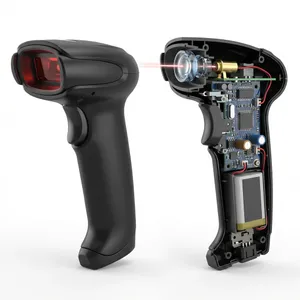
Scanners read the barcode and send data to your computer or software. Choose based on your needs:
- Handheld Wired Scanners: Connected to a computer via USB. Affordable and reliable for billing counters.
- Wireless Handheld Scanners: Bluetooth or RF-connected. Great for warehouse work where you move around.
- Mobile Phone Scanners: Many inventory apps let you scan using your smartphone camera. Good for small businesses starting out.
- Fixed-Mount Scanners: Installed at checkout counters for high-speed retail scanning.
For most small to medium Indian businesses, a wireless handheld scanner offers the best balance of mobility and reliability.
3. Inventory Management Software
This is the brain of your barcode inventory system. The software receives scanned data, updates your inventory records, and gives you visibility into your stock.
Key features to look for:
- Real-time inventory tracking
- Multi-location support
- Low stock alerts
- Integration with billing and accounting
- GST compliance (essential for Indian businesses)
- Reports and analytics
Zubizi’s Barcode Inventory System includes all these features, plus assisted setup for barcode machines, making it ideal for Indian SMEs.
4. Barcode Label Printer
To print your own labels, you need a barcode printer. Options include:
- Thermal Printers: Fast and cost-effective for high-volume printing. They use heat to print on special thermal labels.
- Inkjet/Laser Printers: Use regular printers with barcode label sheets. Better for occasional printing.
Thermal printers are preferred for businesses that print many labels daily.
5. Database or Cloud System
Your inventory data needs to live somewhere. Modern barcode inventory systems use cloud databases that:
- Store all product and transaction data securely
- Enable access from multiple devices
- Provide automatic backups
- Scale as your inventory grows
6. Network Connectivity
For real-time updates across locations, you need reliable internet connectivity. Wi-Fi networks in your warehouse and store connect wireless scanners to your cloud-based inventory software.
7 Benefits of Using a Barcode Inventory System in Your Business
Why should your business invest in a barcode inventory system? Here are seven compelling benefits:
1. Eliminate Data Entry Errors
Manual data entry has an error rate of about 1 in 300 characters. That might sound small, but those errors add up - wrong stock counts, incorrect pricing, and mismatched records.
Barcode scanning achieves 99.99% accuracy. One scan captures the correct product information every time. No typos, no transposed digits, no misread handwriting.
Who benefits most: Businesses with large SKU counts, like apparel stores with size and color variants, or electronics shops with similar-looking products.
2. Speed Up Operations by 80%
Scanning a barcode takes about 2 seconds. Manual entry takes 6-10 seconds per item - plus time to correct errors.
For inventory counts, this difference is massive. A physical count that took your team an entire day can be completed in hours with barcode scanning. Receiving shipments, processing orders, and billing customers all happen faster.
Real impact: Your staff spend less time on data entry and more time serving customers or managing the business.
3. Get Real-Time Stock Visibility
With a barcode inventory system, your inventory updates the moment an item is scanned. Sold something at the counter? Your stock count drops immediately. Received a shipment in the warehouse? It shows up in your system right away.
This real-time visibility means:
- You always know what’s in stock
- You can promise accurate delivery timelines to customers
- Multiple locations stay synchronized
- You can check inventory levels from anywhere
4. Reduce Costs and Prevent Losses
Poor inventory management leads to hidden costs:
- Stockouts: Lost sales when you run out of products
- Overstocking: Money stuck in slow-moving inventory
- Shrinkage: Theft and damage go unnoticed without proper tracking
- Expired goods: Products past their shelf life become unsellable
A barcode inventory system helps you optimize stock levels, catch discrepancies early, and reduce these costly problems. Most businesses see inventory costs drop by 20-30% after implementation.
5. Improve Customer Satisfaction
When customers ask “Do you have this product?”, you can answer instantly. When they order online, you fulfill accurately without sending wrong items. When they request a specific variant, you know exactly where to find it.
Fast, accurate service builds trust. Customers return to businesses that consistently have what they need and get orders right.
6. Scale Your Business Without the Chaos
As your business grows, manual inventory tracking becomes a nightmare. More products, more locations, more transactions - the complexity multiplies.
A barcode inventory system scales effortlessly. Adding 100 new products? Just create and print new barcodes. Opening a second warehouse? Connect it to the same system. The technology handles the complexity so you can focus on growth.
7. Make Better Decisions with Data
Your barcode system doesn’t just track inventory - it generates valuable data:
- Which products sell fastest?
- Which items sit unsold for months?
- What times of day see the most transactions?
- Which suppliers deliver on time?
These insights help you make smarter purchasing decisions, optimize product placement, and plan for seasonal demand.
Types of Barcodes for Inventory Management
Not all barcodes are the same. Here’s a quick overview of common barcode types used in barcode inventory systems:
1D Barcodes (Linear)
- EAN-13: Standard 13-digit barcode used worldwide for retail products. Required for selling on major e-commerce platforms.
- UPC-A: 12-digit barcode common in North America. Similar to EAN but with fewer digits.
- Code 128: Alphanumeric barcode used for shipping labels and internal tracking. Can encode letters and numbers.
- Code 39: Another alphanumeric option, common in manufacturing and logistics.
2D Barcodes
- QR Codes: Square codes that can store URLs, product details, or even images. Scannable with any smartphone camera.
- Data Matrix: Compact 2D codes used when space is limited. Common for marking small components.
For most Indian retail businesses, EAN-13 barcodes work well for products, while Code 128 is useful for internal tracking and shipping.
Getting Started with Barcode Inventory Management
Ready to implement a barcode inventory system? Here’s how to begin:
Assess Your Current Situation
Start by understanding your needs:
- How many products do you manage?
- How many locations?
- What’s your monthly transaction volume?
- What problems does manual tracking cause?
This helps you choose the right system size and features.
Choose the Right Software
Your inventory software is the most important investment. Look for:
- Cloud-based access (work from anywhere)
- Multi-location support
- GST compliance for Indian tax requirements
- Barcode generation and printing
- Integration with your billing system
- Good customer support in your language
Zubizi offers all these features with dedicated support for setting up barcode machines. We help you through every step until your system is running smoothly.
Start with Your Top-Selling Products
You don’t have to barcode everything on day one. Begin with your most important products - your top 20% that generate 80% of sales (the Pareto principle applies here).
Get comfortable with the system on these items, then gradually expand to your full inventory.
Train Your Team
The best system is useless if your staff can’t use it. Spend time training your team on:
- How to scan correctly
- What to do when a barcode doesn’t scan
- How to check and update inventory
- When to escalate problems
Most people learn the basics in a few hours. Regular practice builds confidence.
Run Parallel Systems Initially
During the transition, maintain both your old method and the new barcode system. This helps you:
- Verify the new system works correctly
- Catch any setup issues
- Build team confidence before going fully digital
After 2-4 weeks, you’ll be ready to rely on the barcode system entirely.
Frequently Asked Questions
What equipment do I need for a barcode inventory system?
You need four essential items: barcode labels for your products, a barcode scanner (handheld or mobile), inventory management software like Zubizi, and a label printer if you want to print your own barcodes. For small businesses, starting with a smartphone-based scanner and upgrading later is a cost-effective approach.
How much does a barcode inventory system cost?
Costs vary based on business size. Basic handheld scanners start around ₹2,000-5,000. Thermal label printers range from ₹8,000-25,000. Software subscriptions vary by features and user count. For a small retail shop, expect an initial investment of ₹15,000-30,000 for equipment plus monthly software fees. The ROI typically comes within 3-6 months through reduced errors and time savings.
Can small businesses use barcode inventory systems?
Absolutely! Barcode systems aren’t just for large companies. A small boutique, kirana store, or mobile phone shop can all benefit. Modern cloud-based solutions like Zubizi are affordable and scale with your business. You can start with basic equipment and expand as you grow.
What’s the difference between 1D and 2D barcodes?
1D barcodes are the traditional linear patterns - vertical black and white lines. They encode limited data (usually 12-15 characters) and require a specific scanner. 2D barcodes (like QR codes) use patterns of squares and can store much more information - text, URLs, even images. They’re scannable with smartphone cameras. For basic retail inventory, 1D barcodes work fine. Choose 2D when you need to encode more data or want smartphone scanning capability.
How long does it take to implement a barcode inventory system?
Basic implementation takes 1-2 weeks for a small business. This includes setting up software, printing barcodes for initial inventory, training staff, and going live. Larger businesses with multiple locations or thousands of products may need 4-8 weeks. The key is starting with your core products and expanding gradually.
Conclusion
A barcode inventory system is no longer a luxury - it’s a practical necessity for businesses that want to compete effectively. Whether you run a small shop or manage multiple warehouses, the benefits are clear:
- Accuracy: Eliminate the errors that cost you money
- Speed: Complete inventory tasks in a fraction of the time
- Visibility: Always know what you have and where it is
- Savings: Reduce stockouts, overstocking, and shrinkage
- Growth: Scale your operations without proportional complexity increases
The technology is affordable, the setup is manageable, and the return on investment is quick.
If you’ve been putting off the switch from manual tracking, now is the time. Start with your top-selling products, get comfortable with the process, and expand from there.
Ready to transform your inventory management? Try Zubizi’s Barcode Inventory System - designed specifically for Indian businesses. Our team will help you set up your barcode machines and get running quickly. Contact us for a free demo.